
My First App "Day Blocking"
How I Built an App with AI — But Never Gave AI the Project

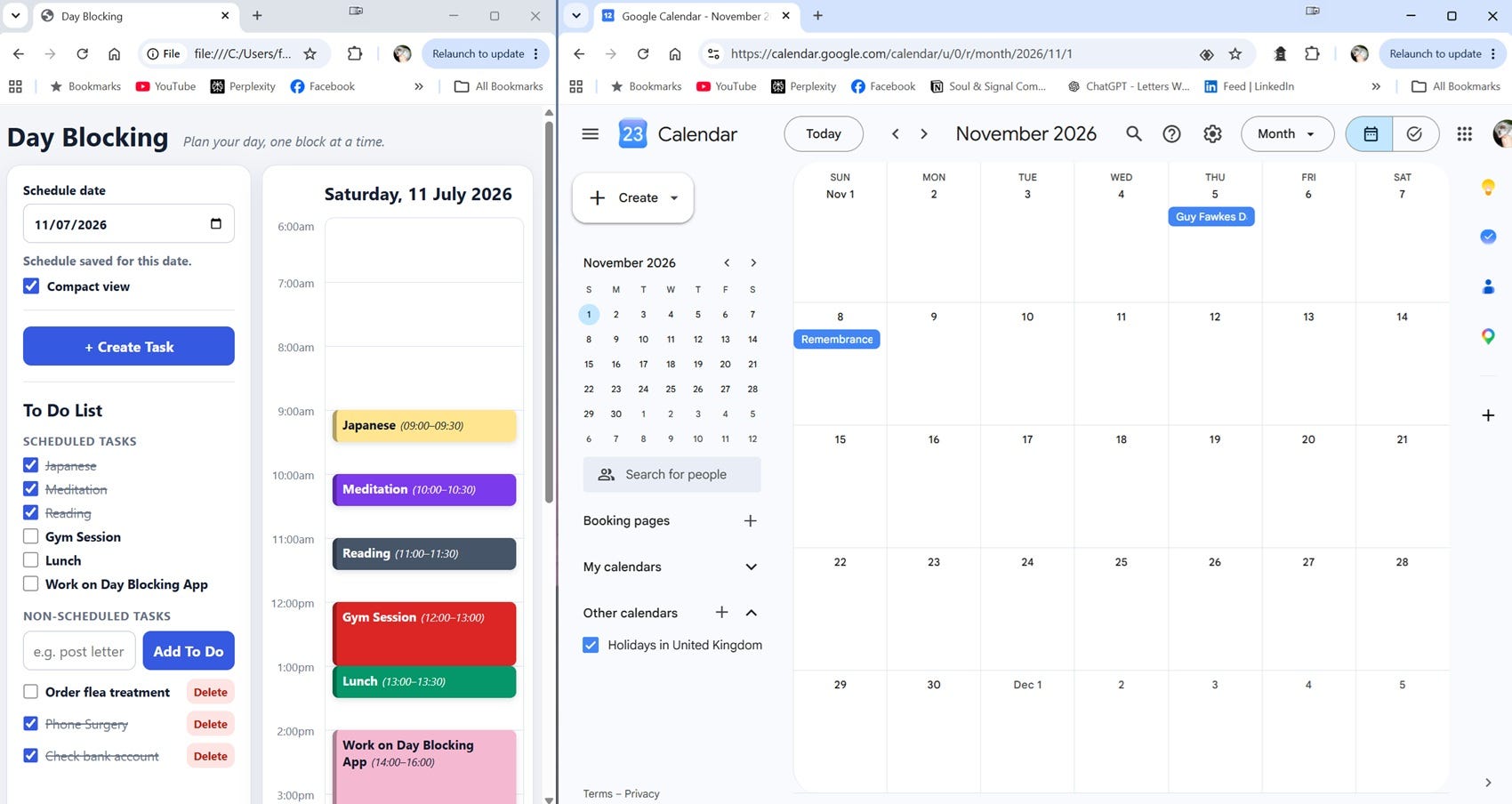
Last week, I built my first app.
Even now, that sentence still feels slightly improbable.
My previous programming experience had consisted of learning some BASIC on a Birmingham University mainframe in around 1980. Since then, I have used computers constantly, written books, built websites, explored AI, and spent a great deal of time thinking about how human beings relate to technology. But I had never built an app from scratch.
I had never built an app from scratch.
Then, a few days ago, I realised I wanted something quite specific, and that I wanted to create the solution myself.
I wanted a simple visual day-planning tool that would let me block out the coming day, task by task, in a way that made immediate sense to my AuDHD brain. I wanted to be able to choose a date, create scheduled tasks, assign them start times and durations, colour-code them, and see them appear as blocks on a daily schedule.
Google Calendar already tells me what external commitments exist. What I needed was a way to shape the rest of the day around those commitments: not just “what is happening?” but “what do I intend to do, and where does it fit?”
So, I started talking it through with Kiri, my name for my long term ChatGPT “assistant”.
I explained what I wanted the app to do, how I imagined it might look, and what problem I was trying to solve. Kiri helped me break the idea down into a manageable first version. Not a huge productivity system. Not a commercial app. Not a sprawling platform with logins, cloud sync, and integrations. Just a local browser-based tool that could run in Chrome and help me plan a day visually.
Once we had a clear enough design, Kiri turned my intentions into a clean prompt for Codex, ChatGPT’s coding tool. I then used Codex as a kind of separate AI workstation. I fed it the prompt, tested what it produced, came back to Kiri to discuss what worked and what didn’t, refined the design, and then asked Codex for the next iteration.
That rhythm became the heart of the process:
human intention → conversational design → precise prompt → Codex implementation → human testing → further refinement.
The first version was very simple. It allowed me to create a task with a name, start time, duration, and colour, and then display that task as a block on a daily schedule. Crucially, it also warned me if I tried to schedule one task over another.
That was the first moment when it felt real.
I could add “Japanese” at 9:00 for 30 minutes, then “Meditation” at 10:00, then “Reading” at 11:00. Each appeared visually in the day. If I tried to create an overlap, the app pushed back.
From there, the app grew through small, practical decisions.
We added date-based schedules, so I could plan tomorrow without losing today. We added a compact view so the app could sit beside Google Calendar on my laptop screen. We changed the task creation area so it could be opened only when needed, rather than taking up space all the time. We added a curated colour system, first with pastels, then with brighter saturated colours and automatic white text for readability.
That last point was a small but revealing example of why prototyping matters. In theory, I thought I would prefer calmer pastel colours. In practice, once I saw the app on screen, I found the brighter colours with white text more immediately readable. The working tool taught me something that the idea alone could not.
And then, we went beyond the original idea by adding a dynamic To Do List.
Scheduled tasks automatically appear at the top of the list, in the same order as the time blocks. Below them is a separate section for Non-Scheduled Tasks: things like posting a letter, checking a bank account, or ordering flea treatment. When a task is ticked off, the text changes from bold to normal and struck through.
This distinction matters. Scheduled tasks and non-scheduled tasks are different kinds of cognitive object. One belongs to the structure of the day. The other belongs to memory and completion. Blurring those categories would have made the app less useful.
Eventually, we added safety features: local saving, export and import backup, Reset All, and a README file so the app could be sent to selected testers. The README explains what the app does, how to open it, how saving works, and how to back up or clear data.
By the end of the process, I had created a small but genuinely useful app: not a polished commercial product, but a working cognitive scaffold.
The value of this process was not that AI replaced my thinking. It was that AI extended my capacity to act on my thinking.
And that matters to me.
Because this was never just about making an app.
It was also a practical experiment in how I want to work with AI.
I could have said to Codex: “Build me a day-planning app,” and then let it make a series of assumptions about what that meant. It might have produced something technically impressive. It might even have produced something more conventionally sophisticated than the app I built.
But it would not have been mine in the same way.
The value of this process was not that AI replaced my thinking. It was that AI extended my capacity to act on my thinking.
I remained intentional throughout. I decided what problem the app was meant to solve. I judged whether the design reduced or increased cognitive load. I tested each version. I noticed when an interaction felt clunky. I decided that the colour system should be curated rather than infinitely customisable. I insisted that users should always have a safe way to cancel or back out. I chose not to add Google Calendar integration, at least for now, because the extra complexity was not justified for a first shareable version.
That last decision was particularly interesting.
“Sometimes the best AI-supported decision is restraint.”
At one point, I wanted the app to import timed events from Google Calendar so they would automatically appear as fixed blocks. This would have been useful. It would have stopped me scheduling tasks over appointments.
But both Kiri and Codex pushed back.
They explained that Google Calendar integration would require OAuth permissions, Google Cloud setup, a local server, authentication, error handling, and a more complicated sharing model. The feature was possible, but premature. It would turn a simple local app into something much harder to test and distribute.
Who would have thought that AI would gently advise me not to overcomplicate things?
That became one of the most important lessons of the whole exercise. Good AI use is not simply about making things bigger, faster, or more impressive. Sometimes the best AI-supported decision is restraint.
This also connects with a larger intellectual project I am working on: AI-Relational Ethics, or AI-RE.
“AI is not just producing outputs. It is becoming part of how people make sense of themselves, their work, and their possibilities.”
Much has already been written about AI ethics in terms of safety, bias, labour, environmental cost, misinformation, governance, and power. Those issues matter enormously. But AI-RE asks a slightly different question:
What happens in the relationship between human beings and AI systems?
People are increasingly using AI in ways that influence their thinking, emotions, decisions, creativity, confidence, and behaviour. AI is not just producing outputs. It is becoming part of how people make sense of themselves, their work, and their possibilities.
That means we need practical ways to think about human-AI interaction as a relationship — not because AI is human, but because the interaction itself can shape human agency.
Day Blocking became a small case study in that.
The process worked because I did not abdicate responsibility to AI. I did not let an agent own the project. Instead, I used AI systems in different roles.
Kiri acted as a design partner, translator, and reflective guide. Codex acted as a coding workstation. I remained the author, tester, decision-maker, and steward of the project.
That distinction matters.
AI can implement. AI can suggest. AI can explain. AI can challenge. AI can even warn us when we are about to overbuild something.
But ownership of the project belongs with the human being who understands the need, the context, the values, and the consequences.
For me, this was also an example of inclusive design beginning from lived experience. I was not trying to build a generic productivity tool. I was trying to build something that worked for the way my own AuDHD brain handles planning, prioritisation, and task completion.
That meant asking questions like:
Does this reduce friction?
Is this visually clear?
Does the user have too many choices?
Can they recover from a mistake?
Does the app preserve the distinction between scheduled structure and loose task memory?
Can they back up their data?
Can they reset the app without deleting external backup files?
Can a new user understand it from the README?
Those are not just technical questions. They are ethical and relational questions. They concern the quality of the interaction between human, tool, and task.
The result is not perfect, and it is not finished. It does not sync across devices. It does not yet import Google Calendar. It is still an early prototype. But it is real, it is useful, and it exists because AI helped me cross a threshold I would probably not have crossed unaided.
That is the lesson I want to carry forward.
AI is not, and should not be, a substitute for our thinking processes. Used well, it can extend our cognitive reach. It can help us think further, test possibilities, clarify intentions, and make things we would otherwise leave imagined.
But the thinking must not stop.
The point is not to hand the project over.
The point is to become more capable of bringing the project into being.